Library Themes
You can change Theme while keeping the same sections meaning you can redesign a site quicker than ever.
Written By Luke Wakefield
Last updated 3 months ago
The styling options vary depending on the core framework, e.g. Tailwind or Bootstrap. Typically Tailwind offers better global styling control given it's focus on utility classes.
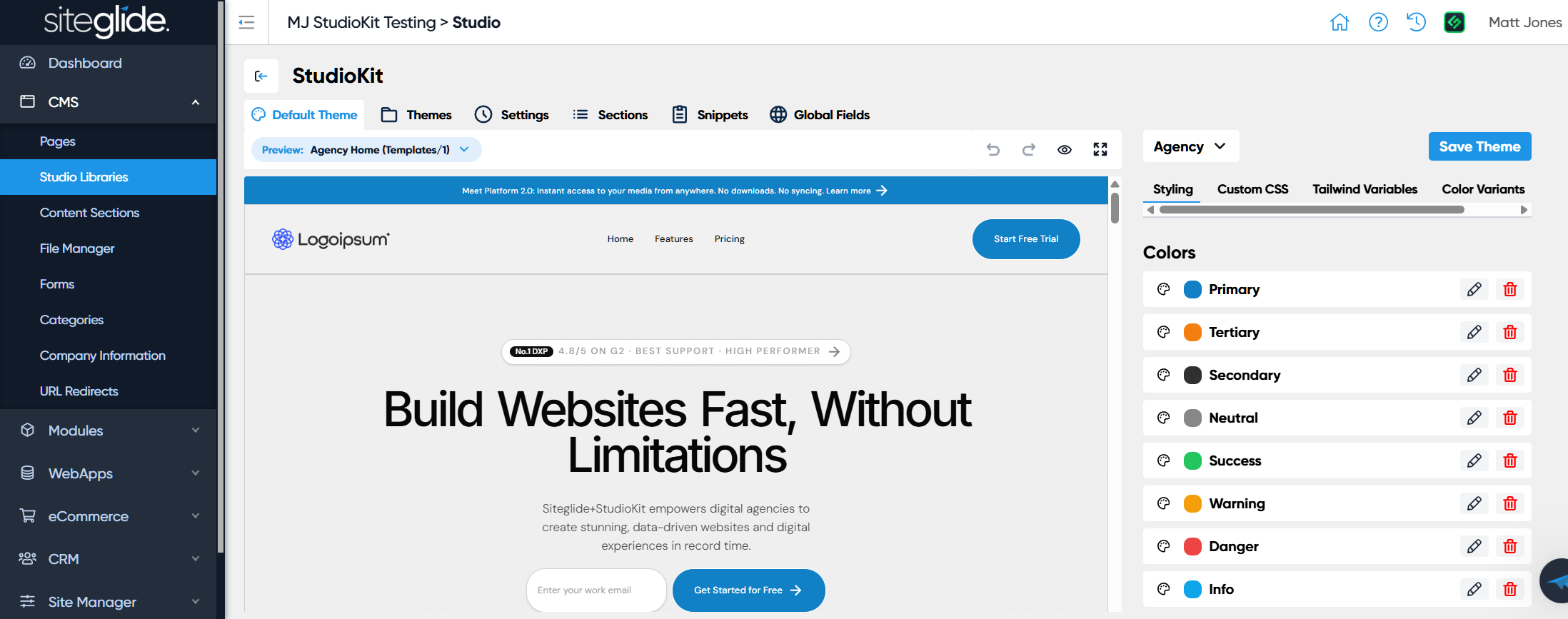
The first tab always shows the Default Theme, you can go to the Themes tab and select other themes where you’ll find a ‘Make Default’ button if you want to use that instead.
Currently whichever Theme is Default will be used for all Studio Pages in that Library (we will soon add the ability to control Theme per Template).
Control the look and feel of your Studio Templates and Pages using the built-in Colour/Font variables as well as the ability to edit the code that's applied before any Page or Template level code.
Developer Tools
The Tailwind Variables tab lets you override and define specific Tailwind Variables (this is only relevant when using Tailwind as your framework). This allows you to add further variables that aren’t available yet in the colours / fonts UI. Both will be combined in the Tailwind @theme part of the config.
The Custom CSS tab allows you to define any specific CSS to override the core framework (Tailwind, Bootstrap etc). We strongly recommend robust CSS which starts by setting default styles for any typography element: headings, lists, blockquote etc. and also styling common elements like cards. This helps to allow a theme to be switched and for it to make a meaningful difference to how sections look.
The Head and Scripts tabs allow you to add HTML to the head and closing body areas of all Pages and Templates that use that Theme.
Colour Variants allow you to give the same section a slightly different look from an adjacent section on the page. Generally the advice when setting them up is to switch around existing variables e.g. switching the primary and secondary colours - but only with CSS scoped within a section with a variant class set. But creative library creators may find other ways to make colour variants work.
Was this helpful?
Still need help? Ask the team